
The Indeemo respondent experience is designed to be frictionless and familiar, mirroring the social apps your participants already use. Understanding this journey helps you see how the platform fosters high engagement and authentic, 'in-the-moment' data.
Onboarding & Registration
The participant journey begins with an invitation - the format of this invitation depends on your Recruitment Method (learn more here):
Regardless of the method, the next steps are built for speed:
- Frictionless Sign-Up: Respondents complete a quick registration and are immediately prompted to download the Indeemo app (Check our Smartphone Requirements to ensure your participants have the right tech).
- First Impressions: Upon logging in, they are greeted by your project’s Introduction.
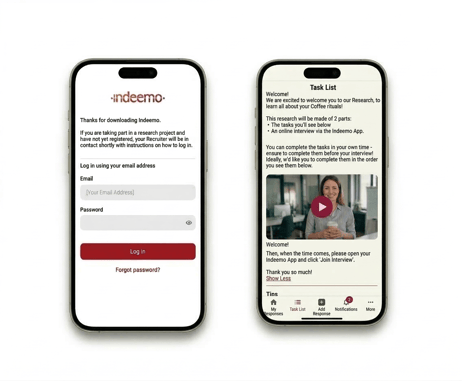
Pro Tip: A Welcome Video in the Introduction helps humanise the experience. Seeing the moderator’s face builds immediate rapport and sets a friendly tone for the study from the very first second.
The Task List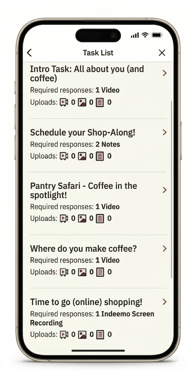
The Task List serves as the participant’s "Activity Centre". It provides a clear, chronological view of their activities, ensuring they always know what to do next. Newly released tasks will be visible in the respondent's Task List, along with all their other assigned tasks.
Task descriptions can include text instructions, photos, and videos. Researchers have the option to release tasks all at once or "drip-feed" them to maintain consistent momentum (see more here).
Capturing In-The-Moment Insights
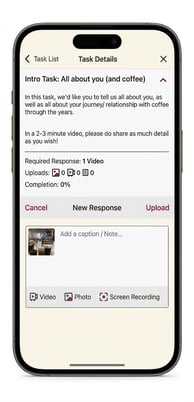
The interface feels like a private social network, encouraging participants to share "micro-moments"—whether in their kitchen, at a store, or on their commute.
- Multimedia Choice: For Standard Tasks, respondents can share video diaries, photos with captions, screen recordings, or text notes.
- Survey Tasks: Respondents may also be asked to answer structured questions — selecting an option, dragging a slider, or ranking a list of items — using simple, mobile-friendly controls. These take seconds to complete and require no typing.
- My Responses: Entries recorded in the Indeemo app are securely saved to the device, allowing participants to upload them when convenient or when a signal is available.
To learn about the structured question format, see Survey Tasks.
Engagement & Probing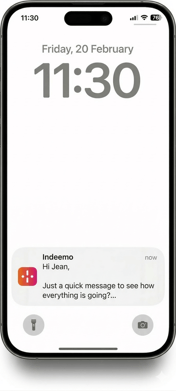
Communication on Indeemo is a two-way street. The app uses push notifications to keep respondents active and informed.
- Notifications & Nudges: Participants receive instant notifications for new tasks, and moderators can send reminders to help them stay on track.
- Comments & Probes: When a moderator comments on a post to "probe deeper," the respondent receives a notification and can reply. This facilitates the real-time, 1-to-1 conversation essential for uncovering rich, qualitative insights.
Resources & Support
To help your participants hit the ground running, you can share our onboarding resources directly with them:
- Downloadable Guide: Guide to Using Indeemo (PDF): A step-by-step walkthrough for respondents covering registration, uploading, and replying to comments.
- Technical Support: Respondents can contact our team via the "Contact Us" button in-app or by emailing participants@indeemo.support.
Next Step
Now that you know how the app looks for a respondent, learn How to Build Your Task List.